Summary

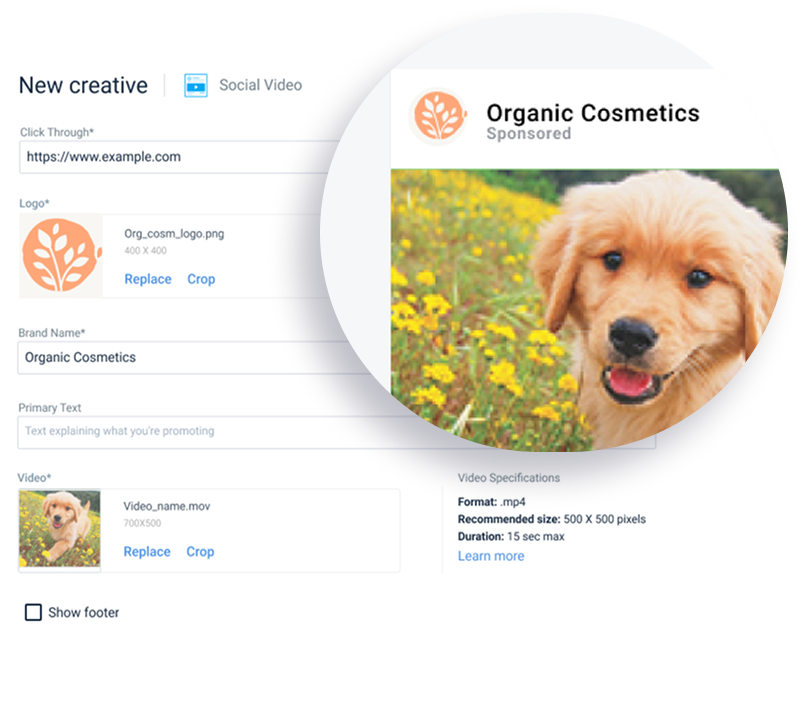
Creating an ad still needed a designer, so advertisers couldn't run a campaign fully on their own. I started with the Creative Library, where advertisers save, reuse and organize their ads, then designed the Creative Editor, a guided way to build and preview an ad inside Ad Manager. I was the sole designer, working with one PM and three engineers.

  • Role

    Senior Product Designer, sole designer

  • Team

    1 Product Designer, 3 Engineers, 1 PM

  • Deliverables

    Research, template wizard, library, formats page, bulk add and edit, UI design

  • Impact

    Removed the designer dependency in everyday ad creation, one of the drivers of the move to 90% self-serve

01 The problem:

An ad needed a designer

This was mostly new ground. Teads Studio, the in-house tool designers use to build complex branding ads, was the faster way to deliver a real ad builder to self-serve clients, so the first builder was developed there and imported into Ad Manager as an iframe. That was less than ideal, but it let us ship faster, and I had to design within the iframe's limits.

  1. A designer was needed. Advertisers couldn't create an ad alone.
  2. No preview. There was no way to see an ad before saving it.
  3. No central library. There was only a basic library of video ads uploaded by the user, and it lived inside a single campaign.
  4. A technical constraint. The iframe shaped what we could build, from an awkward crop window for media to a builder card that couldn't be bigger.

02 What I found

Simple, guided and 1:1

I reviewed Facebook Ads Manager, Google Ads, Snapchat Ads and others, and ran sessions with account managers. I also reviewed Teads Studio, the in-house tool designers used to build advanced ads for premium clients. It took design-specific skills, and some ads even needed code written by ad design engineers. I had to simplify that process and create templates that are easy to manage and create. Five insights came out of it.

  • Guided creation

    A wizard makes creation less overwhelming and improves completion.

  • Guidance at template choice

    Guidance is needed when choosing a template, not only at the end.

  • Cookie-less highlight

    A true 1:1 preview is poorly offered by competitors, so it is an opportunity.

  • Library and bulk actions

    A proper library and bulk add and edit were missing.

03 The decision

Keep the editor inside Ad Manager's self-serve flow

Using the benchmarking and account manager feedback, I argued that a simplified editor belonged inside Ad Manager as part of the self-serve flow. I worked with engineering on the flows and the iframe approach. The trade-offs were real: a strange crop window for media inside the builder and a builder card that couldn't be bigger. That is why some of my designs show a large builder card and others a smaller one.

​

  1. A template-driven wizard from template to launch-ready ad.
  2. Real-time previews across device formats.
  3. A library inside the campaign, with metadata, filters and search.
  4. Bulk actions: Select several creatives to add or edit them at once, and assign a creative from the library while setting up a campaign.

First version

Create Campaign Step 1 - Choose Objective

Choose Creative Type/ Product

New Creative form

Creative Library

Line Level Settings - Assign a creative to the line

Line Level Settings - Assign from Library

04 How it grew

From URL import to a native creative builder

It started small. The first Creative Library had two formats, display and video. Video could be uploaded as a file or as a VAST tag, and display creatives only as a VAST tag. We also wanted to test whether social formats (video and image posts) would be adopted, so we launched by letting users import their ad URL and use it to deliver ads. After that worked, we decided to build a proper way to create ads inside Ad Manager.

  1. Basic first version. Display and video formats, plus URL import to test social formats.
  2. First builder, in an iframe. A core wizard with template, form and save to library, to add social display and video ads. Users could upload their assets, fill in the text and change buttons.
  3. Independent builder. After the successful launch, engineering quietly rebuilt the builder so it no longer depended on the iframe. That let me improve the design a lot, with a new formats page and new formats users could build ads with.
  4. Bulk add and bulk edit. Adoption grew fast and some users had hundreds of creatives. They needed to import information from their briefs in one action and edit several creatives at once. It was the same issue as in campaigns, with hundreds of lines to add or edit at once, so I adopted the bulk edit and add approach we had already developed for campaigns.
  5. Features for performance clients. When performance clients started using Ad Manager, the editor gained a URL parameter builder for click-throughs and dynamic ads, with text or images that change with the viewer's location (city, country, state, province or other geographical designators) or the time.

Step one - importing social ads from URL

Creative library card

Initial Social Ads offering - import from URL

Imported from URL

Step two - designing inside the iframe

Creative editor’s card

Creative editor’s card

Full form - Social Image

Full form - Social Video

Crop media - logo

Crop media - image

Step tree - no more iframe

An important piece of the Creative Editor was the Choose format page, which promoted newly added formats. I created several versions, starting from a basic one and moving to a more visual approach.

Redesigning the formats page - round one

Redesigning the formats page with interactive preview - round two

Redesigning the formats page with interactive preview - round three

Redesigning the formats page with interactive preview - round four

High fidelity prototype - formats

Creative library

Add and edit in bulk

The carousel format introduces specialized form UI components

Creative editor view

Full form view

Cards behavior and states

Error state examples

Upload flow

Crop feature redesign

The updated structure supports ongoing performance feature development in the Creative Editor.

Performance feature - build URL parameter

Performance feature - dynamic creative

05 The outcome

Advertisers launch without a designer

Everyday ad creation no longer needed a designer, so more campaigns could launch on their own. It became one of the projects that moved the platform towards 90% self-serve.

05 Looking back

Designing inside the iframe's limits

Designing inside the iframe's limits was hard and full of trade-offs, but it was the fastest way to give self-serve clients a real ad builder. Once it launched well, engineering built it independently and I could improve the design a lot.

I learned that not everything needs to be pixel perfect. Sometimes you have to think about the business and the users first. Users wanted to build ads as soon as possible and didn't have a tool, and Teads wanted to grow by attracting new types of customers but didn't offer the tools they needed. The iframe was the best path for both, even though I wasn't happy with the full result.

Got a complex product that needs structure? Let's talk.

Summary

Creating an ad still needed a designer, so advertisers couldn't run a campaign fully on their own. I started with the Creative Library, where advertisers save, reuse and organize their ads, then designed the Creative Editor, a guided way to build and preview an ad inside Ad Manager. I was the sole designer, working with one PM and three engineers.

  • Role

    Senior Product Designer, sole designer

  • Team

    1 Product Designer, 3 Engineers, 1 PM

  • Deliverables

    Research, template wizard, library, formats page, bulk add and edit, UI design

  • Impact

    Removed the designer dependency in everyday ad creation, one of the drivers of the move to 90% self-serve

01 The problem:

An ad needed a designer

This was mostly new ground. Teads Studio, the in-house tool designers use to build complex branding ads, was the faster way to deliver a real ad builder to self-serve clients, so the first builder was developed there and imported into Ad Manager as an iframe. That was less than ideal, but it let us ship faster, and I had to design within the iframe's limits.

  1. A designer was needed. Advertisers couldn't create an ad alone.
  2. No preview. There was no way to see an ad before saving it.
  3. No central library. There was only a basic library of video ads uploaded by the user, and it lived inside a single campaign.
  4. A technical constraint. The iframe shaped what we could build, from an awkward crop window for media to a builder card that couldn't be bigger.

02 What I found

Simple, guided and 1:1

I reviewed Facebook Ads Manager, Google Ads, Snapchat Ads and others, and ran sessions with account managers. I also reviewed Teads Studio, the in-house tool designers used to build advanced ads for premium clients. It took design-specific skills, and some ads even needed code written by ad design engineers. I had to simplify that process and create templates that are easy to manage and create. Five insights came out of it.

  • Guided creation

    A wizard makes creation less overwhelming and improves completion.

  • Guidance at template choice

    Guidance is needed when choosing a template, not only at the end.

  • Cookie-less highlight

    A true 1:1 preview is poorly offered by competitors, so it is an opportunity.

  • Library and bulk actions

    A proper library and bulk add and edit were missing.

03 The decision

Keep the editor inside Ad Manager's self-serve flow

Using the benchmarking and account manager feedback, I argued that a simplified editor belonged inside Ad Manager as part of the self-serve flow. I worked with engineering on the flows and the iframe approach. The trade-offs were real: a strange crop window for media inside the builder and a builder card that couldn't be bigger. That is why some of my designs show a large builder card and others a smaller one.

​

  1. A template-driven wizard from template to launch-ready ad.
  2. Real-time previews across device formats.
  3. A library inside the campaign, with metadata, filters and search.
  4. Bulk actions: Select several creatives to add or edit them at once, and assign a creative from the library while setting up a campaign.

First version

Create Campaign Step 1 - Choose Objective

Choose Creative Type/ Product

New Creative form

Creative Library

Line Level Settings - Assign a creative to the line

Line Level Settings - Assign from Library

04 How it grew

From URL import to a native creative builder

It started small. The first Creative Library had two formats, display and video. Video could be uploaded as a file or as a VAST tag, and display creatives only as a VAST tag. We also wanted to test whether social formats (video and image posts) would be adopted, so we launched by letting users import their ad URL and use it to deliver ads. After that worked, we decided to build a proper way to create ads inside Ad Manager.

  1. Basic first version. Display and video formats, plus URL import to test social formats.
  2. First builder, in an iframe. A core wizard with template, form and save to library, to add social display and video ads. Users could upload their assets, fill in the text and change buttons.
  3. Independent builder. After the successful launch, engineering quietly rebuilt the builder so it no longer depended on the iframe. That let me improve the design a lot, with a new formats page and new formats users could build ads with.
  4. Bulk add and bulk edit. Adoption grew fast and some users had hundreds of creatives. They needed to import information from their briefs in one action and edit several creatives at once. It was the same issue as in campaigns, with hundreds of lines to add or edit at once, so I adopted the bulk edit and add approach we had already developed for campaigns.
  5. Features for performance clients. When performance clients started using Ad Manager, the editor gained a URL parameter builder for click-throughs and dynamic ads, with text or images that change with the viewer's location (city, country, state, province or other geographical designators) or the time.

Step one - importing social ads from URL

Creative library card

Initial Social Ads offering - import from URL

Imported from URL

Step two - designing inside the iframe

Creative editor’s card

Creative editor’s card

Full form - Social Image

Full form - Social Video

Crop media - logo

Crop media - image

Step two - designing inside the iframe

An important piece of the Creative Editor was the Choose format page, which promoted newly added formats. I created several versions, starting from a basic one and moving to a more visual approach.

Redesigning the formats page - round one

Redesigning the formats page with interactive preview - round two

Redesigning the formats page with interactive preview - round three

Redesigning the formats page with interactive preview - round four

High fidelity prototype - formats

Creative library

Add and edit in bulk

The carousel format introduces specialized form UI components

Creative editor view

Full form view

Cards behavior and states

Error state examples

Upload flow

Crop feature redesign

The updated structure supports ongoing performance feature development in the Creative Editor.

Performance feature - build URL parameter

Performance feature - dynamic creative

05 The outcome

Advertisers launch without a designer

Everyday ad creation no longer needed a designer, so more campaigns could launch on their own. It became one of the projects that moved the platform towards 90% self-serve.

05 Looking back

Designing inside the iframe's limits

Designing inside the iframe's limits was hard and full of trade-offs, but it was the fastest way to give self-serve clients a real ad builder. Once it launched well, engineering built it independently and I could improve the design a lot.

I learned that not everything needs to be pixel perfect. Sometimes you have to think about the business and the users first. Users wanted to build ads as soon as possible and didn't have a tool, and Teads wanted to grow by attracting new types of customers but didn't offer the tools they needed. The iframe was the best path for both, even though I wasn't happy with the full result.

Got a complex product that needs structure? Let's talk.

Summary

Creating an ad still needed a designer, so advertisers couldn't run a campaign fully on their own. I started with the Creative Library, where advertisers save, reuse and organize their ads, then designed the Creative Editor, a guided way to build and preview an ad inside Ad Manager. I was the sole designer, working with one PM and three engineers.

  • Role

    Senior Product Designer, sole designer

  • Team

    1 Product Designer, 3 Engineers, 1 PM

  • Deliverables

    Research, template wizard, library, formats page, bulk add and edit, UI design

  • Impact

    Removed the designer dependency in everyday ad creation, one of the drivers of the move to 90% self-serve

01 The problem:

An ad needed a designer

This was mostly new ground. Teads Studio, the in-house tool designers use to build complex branding ads, was the faster way to deliver a real ad builder to self-serve clients, so the first builder was developed there and imported into Ad Manager as an iframe. That was less than ideal, but it let us ship faster, and I had to design within the iframe's limits.

  1. A designer was needed. Advertisers couldn't create an ad alone.
  2. No preview. There was no way to see an ad before saving it.
  3. No central library. There was only a basic library of video ads uploaded by the user, and it lived inside a single campaign.
  4. A technical constraint. The iframe shaped what we could build, from an awkward crop window for media to a builder card that couldn't be bigger.

02 What I found

Simple, guided and 1:1

I reviewed Facebook Ads Manager, Google Ads, Snapchat Ads and others, and ran sessions with account managers. I also reviewed Teads Studio, the in-house tool designers used to build advanced ads for premium clients. It took design-specific skills, and some ads even needed code written by ad design engineers. I had to simplify that process and create templates that are easy to manage and create. Five insights came out of it.

  • Guided creation

    A wizard makes creation less overwhelming and improves completion.

  • Guidance at template choice

    Guidance is needed when choosing a template, not only at the end.

  • A real 1:1 preview

    A true 1:1 preview is poorly offered by competitors, so it is an opportunity.

  • Library and bulk actions

    A proper library and bulk add and edit were missing.

03 The decision

Keep the editor inside Ad Manager's self-serve flow

Using the benchmarking and account manager feedback, I argued that a simplified editor belonged inside Ad Manager as part of the self-serve flow. I worked with engineering on the flows and the iframe approach. The trade-offs were real: a strange crop window for media inside the builder and a builder card that couldn't be bigger. That is why some of my designs show a large builder card and others a smaller one.

​

  1. A template-driven wizard from template to launch-ready ad.
  2. Real-time previews across device formats.
  3. A library inside the campaign, with metadata, filters and search.
  4. Bulk actions: Select several creatives to add or edit them at once, and assign a creative from the library while setting up a campaign.

First version

Creative Library - empty state

Choose Creative Type/ Product

New Creative form

Creative Library

Line Level Settings - Assign a creative to the line

Line Level Settings - Assign from Library

04 How it grew

From URL import to a native creative builder

It started small. The first Creative Library had two formats, display and video. Video could be uploaded as a file or as a VAST tag, and display creatives only as a VAST tag. We also wanted to test whether social formats (video and image posts) would be adopted, so we launched by letting users import their ad URL and use it to deliver ads. After that worked, we decided to build a proper way to create ads inside Ad Manager.

  1. Basic first version. Display and video formats, plus URL import to test social formats.
  2. First builder, in an iframe. A core wizard with template, form and save to library, to add social display and video ads. Users could upload their assets, fill in the text and change buttons.
  3. Independent builder. After the successful launch, engineering quietly rebuilt the builder so it no longer depended on the iframe. That let me improve the design a lot, with a new formats page and new formats users could build ads with.
  4. Bulk add and bulk edit. Adoption grew fast and some users had hundreds of creatives. They needed to import information from their briefs in one action and edit several creatives at once. It was the same issue as in campaigns, with hundreds of lines to add or edit at once, so I adopted the bulk edit and add approach we had already developed for campaigns.
  5. Features for performance clients. When performance clients started using Ad Manager, the editor gained a URL parameter builder for click-throughs and dynamic ads, with text or images that change with the viewer's location (city, country, state, province or other geographical designators) or the time.

Step one - importing social ads from URL

Creative library card

Initial Social Ads offering - import from URL

Imported from URL

Step two - designing inside the iframe

Creative editor’s card

Creative editor’s card

Full form - Social Image

Full form - Social Video

Crop media - logo

Crop media - image

Step tree - no more iframe

An important piece of the Creative Editor was the Choose format page, which promoted newly added formats. I created several versions, starting from a basic one and moving to a more visual approach.

Redesigning the formats page - round one

Redesigning the formats page with interactive preview - round two

Redesigning the formats page with interactive preview - round three

Redesigning the formats page with interactive preview - round four

High fidelity prototype - formats

Creative library

Add and edit in bulk

The carousel format introduces specialized form UI components

Creative editor view

Full form view

Cards behavior and states

Error state examples

Upload flow

Crop feature redesign

The updated structure supports ongoing performance feature development in the Creative Editor.

Performance feature - build URL parameter

Performance feature - dynamic creative

05 The outcome

Advertisers launch without a designer

Everyday ad creation no longer needed a designer, so more campaigns could launch on their own. It became one of the projects that moved the platform towards 90% self-serve.

05 Looking back

Designing inside the iframe's limits

Designing inside the iframe's limits was hard and full of trade-offs, but it was the fastest way to give self-serve clients a real ad builder. Once it launched well, engineering built it independently and I could improve the design a lot.

I learned that not everything needs to be pixel perfect. Sometimes you have to think about the business and the users first. Users wanted to build ads as soon as possible and didn't have a tool, and Teads wanted to grow by attracting new types of customers but didn't offer the tools they needed. The iframe was the best path for both, even though I wasn't happy with the full result.

Got a complex product that needs structure? Let's talk.